Wednesday, 15 January 2020

Google Display Ads- ‘Targeting Expansion feature’ explained -By Sarang Kinjavdekar

Google Display ads helps you to expand your targeting reach automatically with the Automatic Targeting feature called Targeting Expansion (previously Targeting Optimization). In this topic, we will talk about how to use it, key features, campaign level benefits and also some of the advantages and disadvantages


Basics- What exactly is Targeting Expansion?

This feature lets Google find more high value traffic to help you get more relevant conversions on top of the audience targeting you have already specified. Think of automatic targeting as a high-impact add-on that supplements the targeting that you’ve already set up.

When to use Targeting Expansion?

This works best for the Advertisers when they want to:


  • Find more customers
  • Identify the best targeting to reach their most likely customers
  • Increase reach without increasing bids or cost per customer


Where to find it/activate it?

This feature can be found under the Ad Group level 

Click image to enlarge

If you move the slider to extreme left, it gets set to zero and that means no Targeting expansion. Use this when you want to deactivate this feature. As you keep on sliding it to right, the more reach you will get. To focus on reach or performance, you can maximise for both by increasing to the maximum reach setting.

Note- All the display campaigns are automatically set at the slider position as seen below. Please bear in mind your campaign targeting restrictions and then deactivate it or otherwise use it by moving the slider to the right position.


When you should not be using this?

Automatic targeting results in new placements, so it's suitable for advertisers who don't have strict brand guidelines about where their ads appear. Also, if you have a very strict requirements and a very specific strategy like Re-targeting, don't use this.

Scope of usage

This works for- 

  • For contextual targeting, such as content keywords
  • For re-marketing and similar audiences targeting


This does not work for


  • Demographics
  • Placements 


Examples of Targeting Expansion

Below is an example from Google for the Retargeting strategy and using Targeting Expansion


 If your remarketing list is for people visiting travel sites about Japan, automatic targeting may extend to show your ad to people visiting sites about Tokyo tourist destinations. If your similar audiences list is for people who have previously made a purchase on your site, automatic targeting may expand to include additional, highly relevant audiences. With the setting maximised, targeting might go further based on your performance and available, relevant audiences.

Another example from Google for the Content Strategy using Keywords targeting strategy and using Targeting Expansion
So if your keyword is 'pens', the first stage of slider may extend to 'felt-tip pens' and 'ballpoint pens', but the maximum reach stage might show your ads in contexts related to 'whiteboard markers' or 'mechanical pencils' – if there’s data to suggest that those keywords will lead to conversions. 

Thanks for reading
Sarang Kinjavdekar

Thursday, 9 January 2020

Google search- Audience Targeting [New Update and announcement]

Google has announced Q4 last year (Oct mid 2019 to be precise)that Advertisers can now use Audience Targeting in Search Campaigns also. This is nothing different from a Display campaign (if I have to make it easy to understand). Here, you have various Targeting options like- Affinity, Custom Affinity, In market, Remarketing , Demographics etc. Good thing is, you can also use this for App Marketing if you are creating it under Search campaign


Why you should consider ?


I find this really useful, now you can combine the Intent with the additional audience layer who have previously shown interest in your product and service.

Below is an example from Google


For instance, let’s say you sell camping gear. To reach avid campers, you can pair an affinity audience like “Outdoor Enthusiast” with generic camping keywords. By adding this additional audience layer, you can reach people who are not only searching for camping products, but are also passionate about the great outdoors.


See the screenshot below and then I will explain it in depth


Here you can 3 options similar to Display Audience Targeting.

Lets see the 1st Option- Search


Here you can see auto populated - (i) Recently seleted audiences and (ii)Easily accessible inMarket and Affinity audiences based on your URL  


Then we click on Ideas - here you can see that based on your Business or Products/Services-certain ideas are auto populated- Feel free to use them or else you can create or mix audiences as needed


Then we will have a look at the Browse Tab- Based on your Goal, Strategy, Funnel level, and path to purchase you can select the audiences


My recommendations


Audiences targeting is an amazing way to reach the Audiences who have intent and also have shown previous Affinity or are in Market. However, I recommend not to combine your best performing campaigns immediately or in other words do not layer it on the existing campaign. I would recommend you to pick a campaign which is not performing well. For instance- Pick up a campaign with very high clicks but absolutely no conversion. If it is a Top funnel campaign, combine it with the Affinity audience and if it is a mid to Lower funnel campaign- combine it with in-Market audiences. Once you have started seeing the results, then slowly move to other campaigns.


Thanks for reading!
Sarang

Tuesday, 26 November 2019

Google Custom Intent Audiences (Display and Video) - Quick guide - By Sarang Kinjavdekar

Are you running a campaign and want to reach the audience who is actively searching your product /services , in a consideration phase or in the midto lower funnel. Then, you can target them by using custom Intent audiences.

This guide will cover how to do the set up and some use cases.


What is Custom Intent Audience(s)?


Custom intent audiences help you define and reach the ideal audience for your business. Built with performance advertisers in mind, custom intent audiences allow you to go beyond pre-defined audience categories and reach people as they’re making a purchase decision.


How do I set up Custom Intent Audience(s)?


Custom Intent audiences can be st up in 2 ways (i) In Google Ads ,Go to shared Library >Audience Manager > Select Custom Audiences> Click on + Button and start the creation (ii) This can also be created once you have selected the campaign goal (or campaign type and under the Audience selection area <<<< We will see the this method here


Step by Step- Creation Guide

*Click on the images to enlarge

Step 1

Start creating the campaign and reach till the Audience section, select as seen below


Step 2

Click on New Custom Intent Audiences


Step 3

This is the overview and some explanation of the screen that opens up


Step 4

Name your audience and then enter keywords and URLs related to products and services that this audience is actively researching


For example, lets say we added few keyword keyword , on the right hand side we will see some suggestions based on the keywords we added


Lets see the 1st part of the Right hand scree which is the "IDEAS"


Now lets have a look at the Audience size section

We have clicked on ADD ALL and then we clicked on the AUDIENCE SIZE


We can also see the Demographics data and it will look something like below-it has Age, Gender and Parental status details


Now lets see, if we target by URL, how does it looks like. In this case, I am taking an example of Amazon


Lets add all the keywords (or you can select the ideas that you like which I recommend)


Now you can see the keywords on left and then the total available audience size on the right hand side


What are the benefits of using Custom Intent Audience(s)?

Custom Intent Audiences are very powerful and below are some the advantages and use cases for you.

Targeting competitors 

Performing a simple competitive research and traffic analysis into your competitors’ most visited (and most valuable pages), as well as the keywords driving traffic to those pages. Based on this you will gain some insights, which can then be used for a custom intent audience campaign.


Case specific Targeting

Get creative, play around with different options- think about your audience first-what are they interested in, where are they spending time, what are they reading. For keywords- you can use Branded, generic, long tail or a mix of all. Really depends how well it aligns with your strategy

Define your own categories ,Experiment and Combine it 

As Custom intent is better than the Custom affinity and slightly lower as compared to in Market audiences. You can take advantage of this, you can go as broader you want (in terms of keywords) or as specific as you want (competitors URL).You can define your own keywords and categories which are presently not available to target.

Thanks for Reading!

Sarang Kinjavdekar

Tuesday, 19 November 2019

Google Remarketing solutions- A top level overview for Advertisers- By Sarang Kinjavdekar


A top level overview of all the Retargeting solutions that Google offers -with a small description- Useful for Advertisers..

Click to enlarge


Tuesday, 12 November 2019

Facebook Advertising - Create multiple Language Ads in 1 Campaign- Quick guide- By Sarang Kinjavdekar

This short article is focused on Language targeting capabilities of Facebook at Ads level- How can you create upto 48 different language ads and that too in a single campaign without having to worry about doing heavy work and then create multiple language based campaigns? Read on...


Before you proceed , read this DISCLAIMERWell I am not a big fan of this feature, I would like to set Country level campaigns first and then select separate languages later (and not mix them into 1 as the case here) and create specific Ads based on languages


I am not sure if you have used this before, Facebook has also a language selection at Ads level. Normally when you advertise on Facebook, you either have  a default or Primary/Business language and you then create campaigns based on this.Or if you are targeting different countries then you pick the language and create the campaigns based on that language. What if you only want to create one campaign and target many (upto 48 languages) and leave it to Facebook to decide which version is the nest for people? Then read on 


NOTE:- Please do not confuse this with Language targeting at Ad set level (see below)


Lets say, you are a small advertiser and want to target multiple languages via a single campaign, then you can look into it. Other use cases? 


What is it exactly?

You can advertise to people in multiple languages with a single Facebook campaign. Facebook will  automatically optimize your budget to deliver your ads.

What is needed before I begin?

Make sure that your advertising objective supports ads in multiple languages

Which Campaign objective offers this features at the moment?

You can choose from traffic (website), app installs, conversions (website), video views, reach and brand awareness.

Where to find it and how to proceed?

Here is where you can find it (click to enlarge)


To get started, follow the procedure as you normally do and then in the Language seletion section (red box above-Select your default language and then when you are done, select Add Languages below Languages. (see below- click image to enlarge)


How many languages can an Ad be made into?

up to 48 more languages.

Can i use some auto translator?

Yes there is an Auto Translator available


Other considerations?

If you chose the traffic (website clicks) or website conversions objective, you can enter a language-specific Website URL. Otherwise, your website URL stays the same for each language.

Thanks for reading!

Sarang Kinjavdekar
Friday, 8 November 2019

For Advertisers- ***NEW Extension*** Lead form Extension - Google Ads-Simplified 'Creation Guide'- By Sarang Kinjavdekar

Google Ads have rolled out this new extension called Lead form extension last month end in October 2019.

This is an amazing add on to the current Ad extensions and is a really good feature for the the Advertisers who are aiming at the Lead generation campaigns


Top level Structure

This is how it look likes at the Top level


Where to find?

This is found at the Campaign Setting level where you create the normal Ad extensions, when you click the + Ad Extension sign, you will find it


How to create?

Once you click the Lead form extension, follow the steps below,click on the button +CREATE LEAD FORM EXTENSION


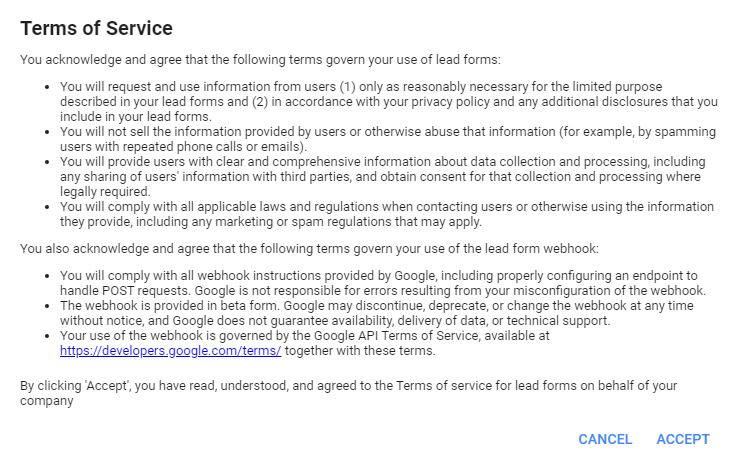
Then accept the Terms and conditions


Next steps

*Click images to enlarge

Follow these steps below:

Select first CTA- this will be visible in the Ad extension under the Ad and then choose the Extension text- 30characters


Enter the Headline, Business Name and description as per the characters limit mentioned

Choose what information you want , just check the box


2nd CTA- At the moment, Visit website and Download CTAs are available
Here you have an option to manage leads in your CRM - Just select the hook here


How will it look like finally?


Before Submission (see right hand side image)


After  Submission


Thursday, 7 November 2019

Available Video Ads formats on Youtube- A very simple explanation- By Sarang Kinjavdekar

I will share a very quick overview of different Video formats along with some other details about the formats available. 


1. Bumper Ads

Duration- 6-second.  Bumper Ads are both a complement to TrueView in-stream and Google Preferred, while also making an impact as a standalone video solution. 
Skip type- non-skippable 
Where will it run?- in-stream ads 
Media buying format- bought on target CPM , generally they offer the lowest CPM and runs majorly on Mobile
Useful for-  broad reach, low CPMs, and video completion.


2. Trueview Ads- Skippable

4 formats are available for Trueview Instream
  1. TrueView in-stream is great at driving consideration and user action.
  2. TrueView for reach offers highly efficient reach to drive awareness at the lowest CPMs.
  3. TrueView discovery can help capitalize on key moments of discovery.
  4. TrueView for action allows advertisers to convert attention and intent of YouTube users into action.


Duration-Preferred up to 15 to 30 second. No issues even if you are using higher length videos, you will be charged if the user watches the full video or first 30 seconds , whichever is earlier OR If a user takes action from the video — such as clicking to visit your site or downloading your mobile app
Skip type- Skippable. A video ad plays before, during, or after other videos, and after five seconds the viewer has an option to skip the ad.
Where will it run?- in-stream ads -Pre roll, mid roll and post roll
Media buying format- bought on target CPM (Also on CPV when True View Instream is used)
Useful for-  additional reach, frequency, and brand awareness.+ consideration and interest


3. Trueview Ads-  Non-Skippable


Duration-up to 15-second 
Skip type- Non Skippable 
Where will it run?- in-stream ads -Pre roll, mid roll and post roll
Media buying format- bought on target CPM 
Useful for-  additional reach, frequency, and brand awareness.+ consideration and interest


TRUEVIEW ADS usage at Top level


4. Outstream Video Ads


Duration- not specific
Skip type- Its on mute , auto plays in the background and when user clicks on it , the audio is enabled  
Where will it run?- run outside of a video stream, such as within a news article or before a mobile game. It extend the reach of your video campaigns beyond YouTube.
Media buying format- bought on target CPM 
Useful for-  additional reach, frequency, and brand awareness.+ consideration and interest


5.  Video Masthead Ads


Duration- not specific
Other important considerations- Its a customized package, so you can modify the video length, select companion banners and be more creative. Masthead provides massive reach in a short period of time, typically around a tentpole event or product launch.
Where will it run?- enables you to showcase your brand on a beautiful video canvas at scale, across all devices, at the top slot of the home feed.
Media buying format- bought usually on target CPD or Cost per Day buying but also available on CPM
Useful for-  additional reach, frequency, and brand awareness.+ consideration and interest


When to use which format, bidding approach and Inventory (in the Conversion Funnel- Awareness, Consideration and Conversion)?


Below is a summary


AWARENESS


CONSIDERATION

CONVERSION / ACTION