Although, Twitter is not that much in demand when it comes to the media mix selection and creation of the media plan- {not for all but for most of the Marketers and Media planners- if they are in B2C). However, it is still a great platform to reach the typical audience (including niche) and many advertisers still prefer it.
In this article, I will take you through the basics of how to create Twitter campaigns, the objectives available and some of the advanced features. I will not go into the Automated campaign creation, we will focus on Manual campaign creation. I personally prefer creating campaigns manually as it give an Advertiser more power in terms of campaign control and spread including targeting and other selections etc. Also, I will not cover the best practices here as the main aim is to demonstrate how to set up the campaign, technical stuff and available creatives/card and targeting options. I will write another post for the Best Practices including the creatives, copy and other areas relevant to it.
Lets Start!!!!

Types of Twitter Campaigns
Ad Placements or to put simply- Where your ads will appear?
It depends on 2 factors (i) Objectives you select (ii) Placements selection
Please note that not all the placements are available for all the objectives- see below for more details


Here is where your ads will appear:
How will you be charged?
Your selected objective decides how your tweet’s performance will be measured and how the pricing of your ad is determined.,for instance: Awareness campaigns charge you for impressions, Follower campaigns charge you per follow you gain, web clicks and conversion campaigns charge you for website clicks and so on.
Basics of Promoted Tweets
What are Promoted Tweets
Promoted Tweets are ordinary Tweets purchased by advertisers who want to reach a wider group of users or to spark engagement from their existing followers. Promoted Tweets are clearly labeled as Promoted when an advertiser is paying for their placement on Twitter. In every other respect, Promoted Tweets act just like regular Tweets and can be retweeted, replied to, liked, and more.
Source- Twitter
How do they (Promoted Tweets )look like?
This is how a Promoted tweet looks like- Main text on the top of the image, a link and also the disclaimer of -promoted tweets

NOTE: Before you start promoting Tweets, make sure you gather enough likes, comments and some traction. This will help you to get more leverage and it will already show some interaction data in the form of likes and comments and will help you to reach more and more people.
There is another format, which is known as Twitter cards
With Twitter Cards, you can attach rich photos, videos and media experiences to Tweets, helping to drive traffic to your website.
Example of a Twitter Card
Below is an example of App Twitter Card, this will help an advertiser drive App Installs

Twitter Card Availability details

Twitter card creation
The process is very simple, see below for more details


In this article, I will take you through the basics of how to create Twitter campaigns, the objectives available and some of the advanced features. I will not go into the Automated campaign creation, we will focus on Manual campaign creation. I personally prefer creating campaigns manually as it give an Advertiser more power in terms of campaign control and spread including targeting and other selections etc. Also, I will not cover the best practices here as the main aim is to demonstrate how to set up the campaign, technical stuff and available creatives/card and targeting options. I will write another post for the Best Practices including the creatives, copy and other areas relevant to it.
Lets Start!!!!

Types of Twitter Campaigns

Ad Placements or to put simply- Where your ads will appear?
It depends on 2 factors (i) Objectives you select (ii) Placements selection
Please note that not all the placements are available for all the objectives- see below for more details


Here is where your ads will appear:
- In searches
- On your profile and tweet detail pages
- In users’ feeds
- The Twitter Audience Platform
How will you be charged?
Your selected objective decides how your tweet’s performance will be measured and how the pricing of your ad is determined.,for instance: Awareness campaigns charge you for impressions, Follower campaigns charge you per follow you gain, web clicks and conversion campaigns charge you for website clicks and so on.
Basics of Promoted Tweets
What are Promoted Tweets
Promoted Tweets are ordinary Tweets purchased by advertisers who want to reach a wider group of users or to spark engagement from their existing followers. Promoted Tweets are clearly labeled as Promoted when an advertiser is paying for their placement on Twitter. In every other respect, Promoted Tweets act just like regular Tweets and can be retweeted, replied to, liked, and more.
Source- Twitter
How do they (Promoted Tweets )look like?
This is how a Promoted tweet looks like- Main text on the top of the image, a link and also the disclaimer of -promoted tweets

NOTE: Before you start promoting Tweets, make sure you gather enough likes, comments and some traction. This will help you to get more leverage and it will already show some interaction data in the form of likes and comments and will help you to reach more and more people.
There is another format, which is known as Twitter cards
With Twitter Cards, you can attach rich photos, videos and media experiences to Tweets, helping to drive traffic to your website.
Example of a Twitter Card
Below is an example of App Twitter Card, this will help an advertiser drive App Installs
Twitter Card Availability details
Twitter card creation
The process is very simple, see below for more details

Twitter Ads creation
So, enough of theory!!!! Lets jump directly into the campaign and ads creation.
The Zeroth step is to select Automated vs Manual creation- it will look like below

STEP 1- Objective Selection
This is the 1st step, you need to select the Objective based on your goal. Following objectives are available

Tip - One campaign should be solely focused on one Goal ONLY. create separate campaigns for separate Goals.
STEP 2- Fill Details
After selecting the objective, you will be directed to this screen. In this step, you need to fill some basic details like campaign name, budget and fight dates

STEP 3- AD Group Creation
So, in Step 1 and Step 2 , we created the Ad campaign. Now in this step, we will create the Ad groups

Here, you will select the name, fight dates, bidding type (can be manual or automatic), optimization preferences and Key conversion metrics
STEP 4- Select creatives
This is little bit weird, we are normally used to select the targeting first and the creatives comes at the last. However, in Twitter comes before targeting

You have an option of selecting the available Tweets or create a new Tweet (if you want to create a brand new ad)- marked in red above.
In this step, add appropriately sized images and Twitter Cards to your Tweet.

Important: See Orange box and Tip above. If you want to create Tweets that won’t show up until the promotion begins, you have that option by clicking the Promoted Only checkbox.
STEP 5-Select Placements
In this step, you will decide where you want your ads to appear

Select the Ad placements
Select the categories which best describes your ads
Enter the domain name of the business that is running the ad
Also, if you want t create more ads, you can clone the existing ad also. See the option above, in the last
Audience summary
The audience summary bar on the righthand side of the screen helps indicate whether or not your audience is too broad.

Final Step- Review and complete
Finally, you’re sent to a confirmation page where you get to review your information and preview your ad.

Twitter Targeting Options Availability
Following are the targeting options available in Twitter.
- Location
- Gender
- Language
- Devices, Platforms, and Carriers
- Keywords, which works like Google’s keywords and allows you to show up in specific searches
- Followed Accounts, so you can reach users who follow certain accounts similar or complementary to yours
- (this can be particularly effective if you’re featuring that add in your account)
- Interests, which can include people interested in job searching, bowling, and cooking
- TV market, which includes people who have watched certain TV shows or movies, which again can be used to create niche ads
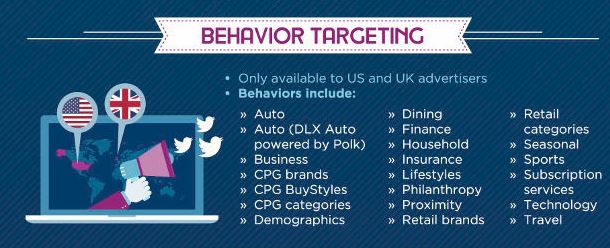
- Behaviors, which can include everything from Charmin buyers to home gardeners.
- Events

See the figure above to get more idea about Targeting and selection.
TWITTER TAILORED AUDIENCES
To make sure that Twitter is at par with competitors offering like Google’s remarketing audiences and Facebook’s Custom Audiences, Twitter has added the Tailored Audiences targeting option. This allows advertisers to reach the existing customers or past website visitors and deliver them highly relevant ads.

Lists- Same like Google customer list- you can upload list of email ids, Twitter Ids or Mobile Advertsing ids. It takes usually 3-6 hours
Website visitors- You need to install Twitter pixel and it works exactly as Google or FB
Option for Conversion Events
Below are various option available
Some use cases for Twitter Remarketing
- Remarket website visitors
- Exclude past converters
- Use remarketing for lead nurturing
- Target your email subscribers
- Deselect “Expand reach by targeting similar users”
Twitter Video Ads
Creation of Twitter Video Ads is very simple. See below

Summary:
You can upload new videos to Twitter Cards under Creatives > Media.
You’ll also be able to insert a headline, call-to-action, and URL to your ad.
Your videos will auto-play on scroll, encouraging people to tap or click.
SAMPLE AD

Twitter Video Ads specs
File Type: MP4 or MOV
Max Play Time: 2 minutes and 20 seconds (select accounts get 10-minute access)
File Size: Under 1GB recommended
Video Codec: H264, baseline, Main or High profile with 4:2:0 color space
Twitter Cards
Basics - How to start
- Choose a card type to implement.
- Add the correct meta tags to the page.
- Run the URL through the validator tool to test. If you are working with a Player Card, request approval for whitelisting. All other Cards do not need whitelisting.
- After testing in the validator or approval of your Player Card, Tweet the URL and see the Card appear below your Tweet in the details view.
There are variety of Twitter card available, see below for details
Types of Twitter Cards
Note: Some cards might not be available as of now. Please check your Twitter account to see which are still valid and available
Summary card
Again , 2 types of summary cards (i) General Summary card (ii) summary card with large image
Requirements: General Summary card
Title: 70 characters
Description: 200 characters
Image: at least 120×120 pixels and no more than 1MB

Requirements: Summary Card with large image
Title: 70 characters
Description: 200 characters
Image: at least 280 x 150 pixels and no more than 1MB

When to use Summary Cards?
Summary Cards can be used to offer a content preview by displaying your title, description and a thumbnail image. The Summary Card can be used for blog posts, news, product pages or any other business news.
Photo Card
If you have a business or website featuring art or photography, then the Photo Card is very useful for you. Like the summary card with large image, the photo card features an image, title, description and Twitter handle.

Gallery Card
Same as photo card, but you can show 4 pictures

App Card
Good for businesses looking to drive app installs

The app card detects that the user is viewing the tweet on an iPhoneor Android and directs him/her to the App Store or Play store to download the app-based on the OS on device he/she is using
Player card
The Player Cards have been created in order to promote streaming media like video or audio player inside your tweetThis card puts a live video or audio player within your tweet that users can play on Twitter and in embedded tweets.

Product Card
If you are ecommerce business, this card is very beneficial for you.The product card allows you to include a title, description, thumbnail image and Twitter handle attribution for your product, along with other pertinent details such as price, location, availability, etc.

Lead Generation Card
Best, if you are looking for Leads. When users see a lead generation card, they can click one button and share the email address associated with their Twitter account with you.

Website Card
If you are looking to drive traffic, then this card is for you. You can drive traffic directly to your website’s homepage or other specific landing page.The website card simply includes a thumbnail image representing your website, your website title and a Read More call-to-action button to encourage viewers to click through.

Technical Work to Install Cards
You need to add the appropriate metadata to the head section of your website. This metadata can be found on the developer page, however I am mentioning some metadat card details of few the cards underneath [the metadata is not needed to be added for lead generation and website cards-To create lead generation cards and website cards, you need to log into the Twitter Ads interface and click on Cards under the Creatives menu. Once you’ve completed your cards, you’ll be given a custom link to add to your tweets.
Once you’ve installed the code for your Twitter cards, use the Twitter Card Validator to ensure everything is working properly and to verify your Twitter cards. Once verified, your cards will start showing up in relevant tweets.
Card validator

The above is how to validate the card , click on the link above and start the validation before going libe
Summary card Metadata
To add it to your website, you need to paste this code in your webpage HTML:
<meta name=”twitter:card” content=”summary” />
<meta name=”twitter:site” content=”@yoursite” />
<meta name=”twitter:title” content=”Your Title” />
<meta name=”twitter:description” content=”Your description.” />
<meta name=”twitter:image” content=”https://where-your-image-is-hosted/name.jpg” />
For summary CARD with Large image, Add this HTML code to set up this type of Twitter Cards:
<meta name=”twitter:card” content=”summary_large_image”>
<meta name=”twitter:site” content=”@yourwebsite”>
<meta name=”twitter:creator” content=”@yourtwitterhandle”>
<meta name=”twitter:title” content=”your title”>
<meta name=”twitter:description” content=”your description.”>
<meta name=”twitter:image” content=”https://where-your-image-is-hosted/name.jpg“>
APP CARD Metadata
Here is the code you should enter:
<meta name=”twitter:card” content=”app”>
<meta name=”twitter:site” content=”@yourwebsite”>
<meta name=”twitter:description” content=”your description”>
<meta name=”twitter:app:country” content=”your country like US”>
<meta name=”twitter:app:name:iphone” content=”your iphone app name”>
<meta name=”twitter:app:id:iphone” content=”your iphone app ID”>
<meta name=”twitter:app:url:iphone” content=”your iphone app URL”>
<meta name=”twitter:app:name:ipad” content=”your ipad app name”>
<meta name=”twitter:app:id:ipad” content=”your ipad app ID”>
<meta name=”twitter:app:url:ipad” content=”your ipad app URL”>
<meta name=”twitter:app:name:googleplay” content=”your googleplay app name”>
<meta name=”twitter:app:id:googleplay” content=”your googleplay add ID”
TWITTER ANALYTICS
Go to Twitter Analytics and click Twitter cards, you can see all the analytics data there.

You can also check the performance of each card and compare it with other(s) as seen below

Other Important Things to Note
Below are few other things that you can do
Promoted Account
Here, you are promoting an Account , not an individual Tweet.They appear in your target audience’s timeline as well as the all-important ‘who to follow’ suggestion column and in search results.

Promoted Trends
When users click on your Promoted Trend, they will discover a list of search results on your topic with your Promoted Tweet at the top of the pile. If they start to discuss your chosen hashtag with others, your campaign will receive organic exposure

TARGETING OTHER OPTIONS




Thanks for reading!
Sarang


